Customer Communication Shouldn't Create More Work: Meet the New ServiceBridge Messaging Experience
By Myles Primm, Digital Content Manager
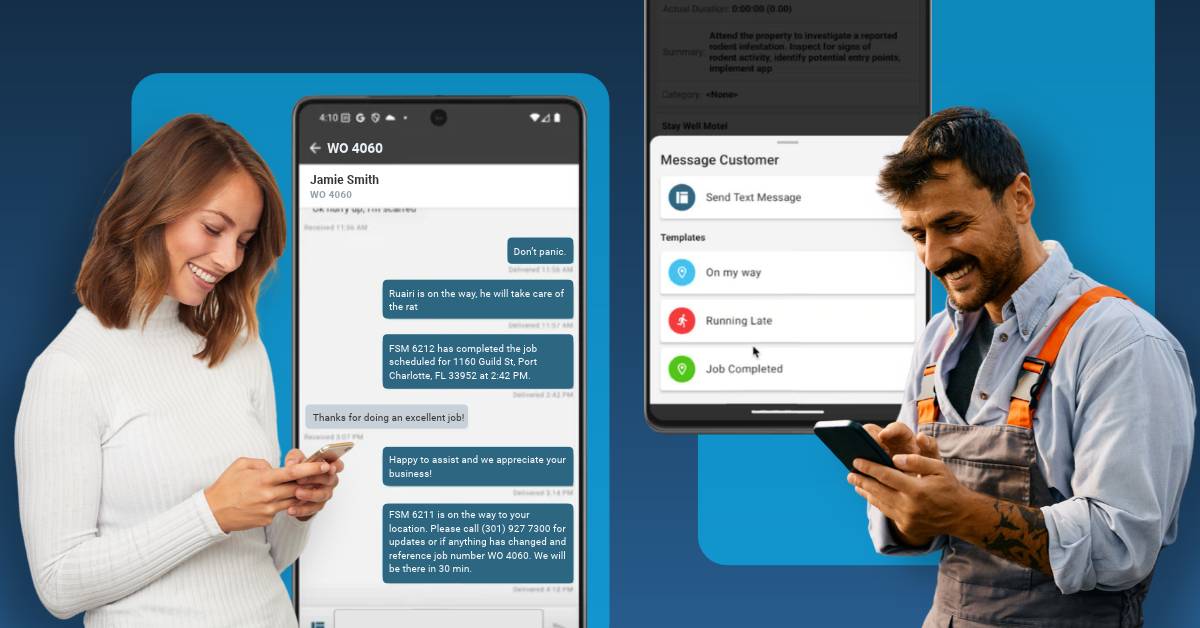
For field service businesses, communication is part of every job. Customers want to know when their technician is arriving, technicians need quick ways to share updates, office teams need visibility into what is happening in the field, and someone still has to follow up on estimates and unpaid invoices.
The problem is that keeping everyone informed can quickly become another job on its own. Phone tag, manual reminder texts, missed calls, and repetitive follow-ups take time away from the work that moves the business forward. ServiceBridge is introducing new communication and automation capabilities designed to change that, including Two-Way Texting and Automatic Reminders.
Stop Playing Phone Tag with Your Customers
Think about how many small conversations happen during a typical service call. A technician needs to tell a customer they are on the way. The customer needs to provide gate instructions. Someone calls the office asking when the technician will arrive. Later, the office needs to follow up about an estimate or outstanding invoice.
Individually, these interactions may only take a few minutes. Across dozens or hundreds of jobs, however, they can create hours of administrative work. Worse, when communication happens through personal phones or separate channels, important information can become disconnected from the actual job.
ServiceBridge Two-Way Messaging gives technicians, and office teams a simpler way to have real, two-way SMS conversations with customers directly through ServiceBridge. Unlike basic notifications or predefined status messages, teams can send and receive free-form text messages, allowing technicians, office staff, and customers to carry on a natural conversation about the job. From quick updates to questions, access instructions, scheduling changes, and more. Customers simply reply from their phone's native messaging app.
ServiceBridge ensures messages stay connected to the work order, estimate, and customer record, while office teams can view and respond to conversations through the Message Center. A technician might text "I'm on my way," a customer can reply with a gate code or special instructions, and the office can step into the conversation when needed.
Everyone stays connected through one continuous communication thread, giving customers a more responsive experience while providing the business with visibility and a clear record of what was communicated.
Put Routine Follow-Ups on Autopilot
Some customer communication requires a conversation. A lot of it doesn't.
Appointment reminders, estimate follow-ups, and invoice reminders are important, but they are also repetitive. When staff members have to remember to send each message manually, it creates more administrative work and makes it easier for follow-ups to fall through the cracks.
ServiceBridge Automatic Reminders help take those routine tasks off your team's plate. Businesses can configure SMS reminders for upcoming appointments, open estimates, and invoices based on timing and triggers that work for their operation.
Instead of spending the day asking, "Did anyone follow up with that customer?", ServiceBridge can help make those touchpoints part of the workflow. That can help reduce missed appointments, keep outstanding estimates top of mind, support faster payments, and save back-office teams from repetitive calls, emails, and texts.
Better Communication at Every Step of the Job
The biggest advantage isn't any single text or reminder. It's creating a more connected customer journey from the moment a job is scheduled until the final invoice is paid.
Before the job, Automatic Reminders can help customers remember upcoming service and prepare for the appointment. During the job, Two-Way Messaging keeps customers, technicians, and office teams connected for ETAs, questions, updates, and access information. After the job, automatic estimate and invoice reminders can keep opportunities moving and help teams stay on top of outstanding revenue.
Instead of adding another communication tool that employees have to manage, ServiceBridge brings more of the customer conversation into the same field service management platform your team already uses to manage the work.
Choose the ServiceBridge Plan That Fits Your Business
Alongside these new capabilities, ServiceBridge is introducing three new plans: Essential, Enhanced, and Complete. The goal is to make it easier for businesses to understand which ServiceBridge capabilities fit the way their teams operate today while giving them room to grow.
Essential provides the core field service management tools businesses need to stay organized and keep work moving. Enhanced expands those capabilities to help teams streamline everyday operations and work more efficiently. Complete delivers the full ServiceBridge experience, bringing together advanced communication, automation, payments, and connected workflows to reduce manual work and create a better customer experience.
Spend Less Time Following Up and More Time Moving Forward
Great customer communication shouldn't mean more work for your technicians, dispatchers, or office staff.
With Two-Way Messaging and Automatic Reminders, ServiceBridge gives field service businesses more ways to keep customers informed without adding repetitive tasks to the day. From the first appointment reminder to the final invoice follow-up, your team can create a more connected experience while spending less time chasing calls, messages, and reminders.
Because when communication becomes part of the workflow instead of another item on the to-do list, your team has more time to focus on what matters most: serving customers and growing the business.
Ready to see ServiceBridge in action?
Get a Free Demo